 VetoDossier
Pet health record app: a free digital health record for every animal in your household
Practical guide Up to date as of 8 November 2026 · Sources: service-public.gouv.fr, I-CAD, French Ministry of Agriculture
VetoDossier, the shared medical record for pets, is also a health record app for every animal in the house: one account, one profile per animal, whatever the species. If your clinic uses VetoDossier, it puts its documents there with nothing more than your phone number; if it does not, you give it your record's email address to use as your contact email. It is free. In any browser the record works in English, and the same account opens in the iPhone and Android apps. This page covers what changes when you have several animals, and several clinics.
The apps are on the App Store for iPhone and on Google Play for Android, in French for now.
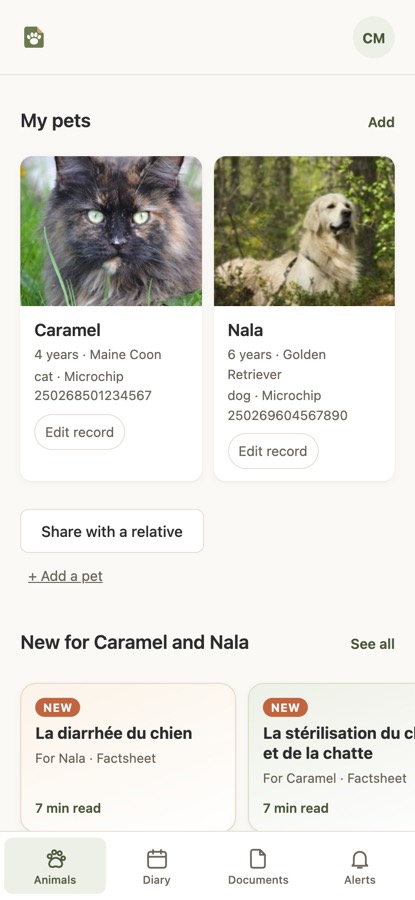
One account for the household, a profile for each animal
In the record, “Add a pet” creates a profile with the animal's name, its species and, if you have them, its microchip or tattoo number, date of birth, sex and breed. You type in the species yourself rather than picking it from a list: dog, cat, rabbit, ferret, guinea pig, budgie, tortoise. No proof is asked for. Two dogs, a cat and a rabbit fit in the same account, each with its own profile, and each profile names its own usual vet: the cat's clinic is not necessarily the dogs'.
Species makes a practical difference in two places. In the animal's vital information, which the emergency card draws on, the blood type is chosen from a closed list for cats (A, B, AB) and for dogs (DEA 1 positive or negative), because those are the blood groups known in these two species. For any other species it is a free field, where you copy what your vet wrote, with the date of the test and the name of whoever carried it out. Without those two details, whatever the species, the profile shows the blood type as “Declared, with no source”. And our health fact sheets, under “Health & advice”, exist only for cats and dogs, and only in French; there is nothing yet for the budgie.
The microchip number is optional when you create the profile, but it is the number a clinic types in to find the record. In France, identification is compulsory for dogs over four months old and cats over seven months old, and before any animal is sold or given away; I-CAD, the French national pet identification register, is where it is recorded. To travel within the European Union, a ferret, like a dog or a cat, must be microchipped, vaccinated against rabies and carry a European pet passport issued by a vet. The microchip guide (in French) covers the rest.
Digital, online, electronic, app: one and the same record
A “digital”, “online” or “electronic” pet health record, or a “pet health app”: here, all four mean the same thing. The record opens in any browser at vetodossier.fr/carnet, in English if your browser is set to English, and a “Français · English” button switches it at any time. The Android app and the iPhone app are this same record installed on the phone, with the same documents. You photograph the rabbit's booklet in the app in the morning and read it again on the computer in the evening.
The iPhone and Android apps are in French for now; the English version works in any browser, including on your phone. The apps are listed on the French App Store and Google Play, so a store account from another country may not show them.
You sign in with your phone number or your email address, and a password. On a new phone, or a computer you are using on holiday, a code arrives by email the first time the record sees a device it does not recognise. That email, like all our emails, is in French.
How documents arrive, and on which profile
Through your record address. Your account has an address along the lines of firstname.surname@vetodossier.com, one for the whole household. You give it to your clinics as your contact email. The first email from each sender waits for your approval; later ones come straight in. The address does not say which animal a document is about: with one animal on the account, the document goes onto its profile; with several, it waits in the “To sort” box on the Home screen, where you choose the profile. The record address page (in French) explains the rest.
From your clinic, with your phone number. A registered clinic sends the document from VetoDossier, using only the number you gave it, and types in the animal's name: the document goes onto that profile, under its date and in its category. If the animal had no profile yet, one is created with the document. The document is never translated: a prescription written in French arrives in French.
By you, for everything else. The rabbit's booklet from the breeder, the ferret's transfer certificate: you photograph them with your phone, page after page, or choose a file, then pick a category for each. Whatever you upload is marked “Added by you”, so a vet can tell it apart from what a clinic sent. Filed something under the wrong animal? Open the document from the record in a browser: the panel below it shows where it is filed, and “Change” on the Animal line moves anything you uploaded to the other animal, with no need to photograph it again.
In “My documents”, one filter by animal and one by source (a clinic, an email, or you) pick out what the cat's clinic sent. A document opens full size, and “Forward” sends it through the phone's share sheet, by Mail or WhatsApp: the cat's vaccinations and the dog's reach the kennels and cattery in two messages.
Each animal's emergency card, and its QR code
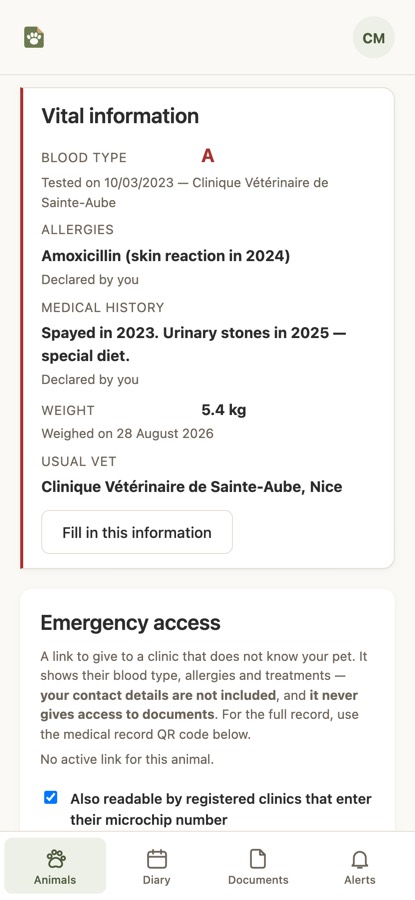
For each animal, the “Vital information” screen brings together what an out-of-hours vet wants to know first: blood type, allergies, medical history, current treatments, weight and usual vet. The weight never appears without the date it was taken: a vet uses it to work out a dose, and needs to know how recent it is. You fill this in yourself, and the lines you declared say so. An empty field reads “Not provided”: the record never writes “no allergies” on your behalf.
A link or a QR code opens the card without an account, at any vet; each animal has its own, on the cat's carrier or the dog's tag. Anyone can photograph a collar or a carrier, so the card carries neither your contact details nor any document, only what is needed to treat the animal. The card itself is shown in French. If a clinic registered with VetoDossier enters the animal's microchip number, it sees the same card at once; you are notified every time, and you can turn this off whenever you wish. The emergency card guide (in French) says what to put on it.
What a shared medical record means for an animal
A shared medical record, for an animal, is a single record that several clinics can read with the owner's agreement, rather than each clinic keeping its own. In VetoDossier, a registered clinic types in an animal's microchip number to ask for access to its record. The request arrives in your record, and until you accept, the clinic sees nothing. Access covers that animal alone: the cat's clinic does not see the dogs' records. Each time the clinic views the record, the view is entered in a log that only you can read, and you can withdraw access at any point. For a vet you see only once, a link valid for seven days opens one animal's record.
The record follows the animal. A new clinic asks for access and reads what the previous ones sent, and if the animal changes hands, its history can go with it, with everyone's agreement. The shared medical record page (in French) explains how the request works and what you see of it.
A complete record, as a clinic reads it
Before you create an account, open the record of a fictional animal, Pistache, a female cat whose history we made up. It is the page a vet or a nurse reads when you share a record by link or QR code, with a “fictional animal” banner added; a dog's, a rabbit's or a ferret's reads the same way. No account is needed. The demonstration record is in French, like every record shared by link or QR code.
Open the demonstration record (in French)
Or scan this QR code. The animal and its documents are fictional.
Free, and what the app does not do
The app and the record are free for owners and clinics alike, and no card is needed. If that ever changes, you will be told beforehand. Your data leaves whenever you want it to: you can export all of it, or delete your account, from the record itself.
The app does not book appointments (those your clinic enters do show in the “Diary”), does not send messages to your vet, does not chart your animal's weight and does not read your documents to extract medical data. It keeps your documents, files them and shows them to whoever you choose. The vaccine booster your clinic noted, a current treatment, the wormer or flea and tick treatment you declared as a treatment: your record reminds you of each, animal by animal. There is a page for the dog and one for the cat.
Key points
- One household, one account; one animal, one profile; you type in the species yourself, and no proof is asked for.
- One record address and one phone number for all your clinics; a document sent by a clinic lands on the profile of the animal it names; an email waits in “To sort” until you choose the profile.
- Each animal has its own emergency card and QR code; a clinic's access to the full record is given animal by animal, and can be withdrawn.
- “Digital”, “online”, “electronic”, “app”: the same record, on the web and in the apps, which are in French for now.